

1. What is a web server?
Simply put, a web server is software or hardware that delivers web pages to a client (a browser). A web server can host one or more websites, depending on its configuration and the capabilities of its own hardware.
A client is any device that can access the Internet, such as a smartphone, smartwatch, IP camera, laptop, or desktop computer, and request data from a web server, usually using a web browser such as Chrome or Firefox.
Web servers have existed since the Internet first appeared, and the technologies they use, along with the content they serve, continue to evolve and shape the World Wide Web we use today. The very first web server was a NeXT Computer workstation with an Ethernet setup at CERN in 1990, built by Tim Berners-Lee, who is credited with creating and establishing the protocols that make up the Internet.
2. And which web servers are the best?
2.1 Apache
By far the most widely used web server is the Apache HTTP Server from the Apache Software Foundation. Created in 1995 by Rob McCool and Brian Behlendorf, its name is a pun on “patchy server,” since Apache was based on some existing code as well as some, perhaps, “hacky or makeshift” software packages that allowed it to work. The name Apache was also chosen out of respect for the various Native American peoples who collectively called themselves Apache, and were well known for their military strategy and inexhaustible endurance. According to W3Techs, as of September 1, 2020, Apache's market share is around 36%.
Apache's dominance is no mere coincidence. To a large extent, it secured its position because Apache comes preinstalled with all major Linux distributions. This makes it easy to get started, since it's already installed. We should also remember that the main protocol we use on the Internet—HTTP—is synonymous with the name of the process Apache runs under on Linux: HTTPD, also known as the HTTP daemon.
2.2 Nginx
Another very popular web server is Nginx (pronounced “engine-x”). Created by Igor Sysoev and released in 2004, Nginx was designed with the explicit goal of outperforming Apache web server technology. It currently holds around 32,5% of the market, and that figure continues to grow.
Serving only static files by default, Nginx uses much less memory than Apache and can theoretically handle four times as many requests per second. That's why it was initially used as a load balancer or reverse proxy for busy websites. As the software evolved and its codebase grew, Nginx was able to replace Apache completely, rather than simply work alongside it.
2.3 LiteSpeed Web Server
The LiteSpeed Web Server, or LSWS for short, is practically a newcomer on the web server “scene.” Over the past few years, it has gained enormous, perhaps even cult-like, popularity among web hosting companies thanks to its efficiency. With its streamlined architecture, a company using LiteSpeed can (theoretically) double the maximum capacity of the websites on its servers if it was using Apache before.
Imagine you're a web hosting company, and you have 20 servers in your fleet running Apache, each able to host 200 websites. That's a maximum of 4000 websites that your resources can support. Then you learn about LiteSpeed Web Server, which offers the ability to double the capacity of your server fleet and host up to 8000 sites on the same hardware, just by installing an application? Pretty tempting.
2.4 Microsoft Internet Information Services
Microsoft Internet Information Services, or IIS for short. There's nothing explicitly wrong with using IIS, but it's quite difficult to find a web hosting company that uses it. First, IIS only runs on Windows Server, which requires (often quite expensive) licenses, and many hosting companies simply don't want to spend the money. Second, IIS isn't very good for PHP-based applications such as WordPress. Although WordPress can theoretically run on IIS, it's a real pain that can involve sorcery and ritual dances just to get it to work in the first place.
Microsoft IIS is designed for corporations that still use applications or websites written in its proprietary ASP.NET code, which powers a lot of business software. It's in the corporate business world that you'll actually encounter IIS servers running these applications, which are often very outdated, sometimes even decades old, or complex internal portals for employees. IIS is often paired with Microsoft SharePoint, a collaboration software suite (used in Office 365, OneDrive, and other Microsoft products), or Dynamics, an ERP (CRM) application for managing and tracking business processes.
3. So what's the big-picture difference?
There isn't a simple answer to that. There's no one-size-fits-all solution.
Apache is an excellent choice for administrators and hosting providers who might need something highly configurable, since there's a huge number of precompiled modules available that can be added on the fly. These modules range from general-purpose ones, such as improving security or fault tolerance, to support for specific packages for PHP, TCL, Python, Ruby, and so on.
Apache is also reliable and stable, and is considered convenient and easy for beginners to learn when installing it for the first time. Because Apache is so widely used, it often gets security and feature updates, and it has a huge community of people who can help with any problems or questions that come up.
Also, one very important thing: Apache works great with applications that use CGI. Although Nginx, for example, technically supports CGI scripts, a beginner won't be able to configure it on the fly, and most tasks like this require installing additional modules.
One feature of Apache that many people criticize is its use of .htaccess files to manage things like Rewrite Rules, file and directory permissions, and search engine indexing. When these files are enabled, Apache traverses all the directories up to the parent directory and executes the commands listed in each .htaccess file. Naturally, this increases response time and takes a pretty big bite out of server resources.
Nginx itself can work as a reverse proxy in front of Apache, or as a standalone web server, and it has no equivalent feature for .htaccess files. Python and Ruby applications are known to perform well on Nginx. With load balancers, some optimization, and Nginx, you can build high-load applications. But Nginx also has a less-than-great reputation for being difficult to configure compared to Apache.
Comparing Nginx with LiteSpeed isn't entirely fair, and generally doesn't work very well, because although they're similar, they're both highly specialized for specific needs. For example, Nginx works very well with Ruby applications, while LiteSpeed has server-level caching plus additional modules such as lscasche and lsphp, which help speed up applications such as WordPress, MediaWiki, and Magento considerably.
For web hosting, the main problem we face isn't blocking DDoS attacks or securing our servers. That's easy compared to preventing crashes caused by too many simultaneous site visitors consuming all the server resources, such as RAM and CPU. With Apache, this is generally a real problem, especially with very busy websites, since every site visitor makes Apache open a new process thread on the server, and while they're on the website, those processes hang around and load the hardware, whether or not they requested those resources.
This is just one of many reasons LiteSpeed has become so popular, especially among web hosting companies. Since LiteSpeed is a full replacement for Apache, administrators don't have to spend a lot of time maintaining the server. It also includes built-in protection against DDoS attacks by limiting bandwidth and the number of connections per client. LiteSpeed WebServer is also the only product on the market with full support for HTTP/3, which improves the efficiency of client-server architecture interactions. This means that when your user's web browser requests resources from your website, such as images and videos as well as text, they are sent in continuous streams rather than in pieces, and content is delivered as needed rather than all at once, as with other web servers, whether or not it was requested.
And now for the benchmarks
3 identical virtual machines with the following specifications were used for testing:
| Apache | LiteSpeed | Nginx |
| 2 vCPU | 2 vCPU | 2 vCPU |
| 4 GB RAM | 4 GB RAM | 4 GB RAM |
| PHP 7.4.21 | PHP 7.4.21 | PHP 7.4.21 |
| cPanel / WHM | cPanel / WHM | cPanel / WHM |
| Apache 2.4.46 (cPanel) | LiteSpeed/5.4.10 Enterprise | nginx/1.19.2 |
| MariaDB 10.3.25 | MariaDB 10.3.25 | MariaDB 10.3.25 |
| PHP SAPI = fpm-fcgi enabled | PHP SAPI = litespeed | PHP SAPI = fpm-fcgi enabled |
Apache benchmark configuration
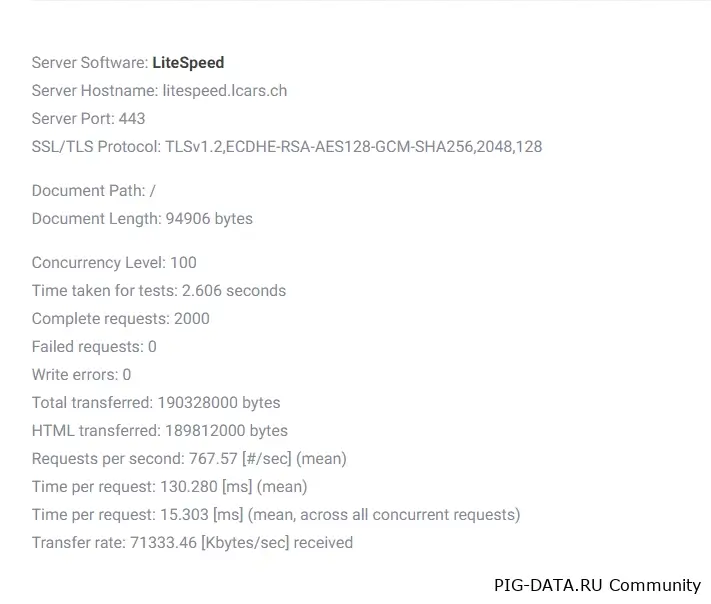
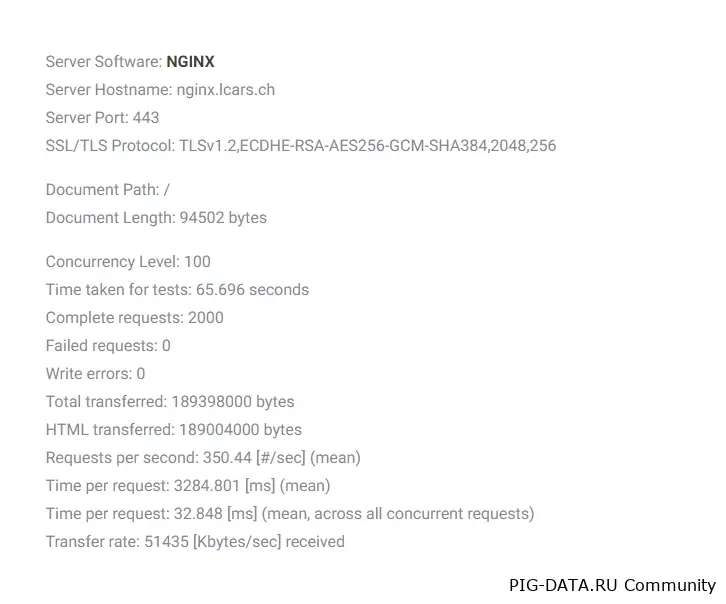
The ApacheBench application was used. Command:
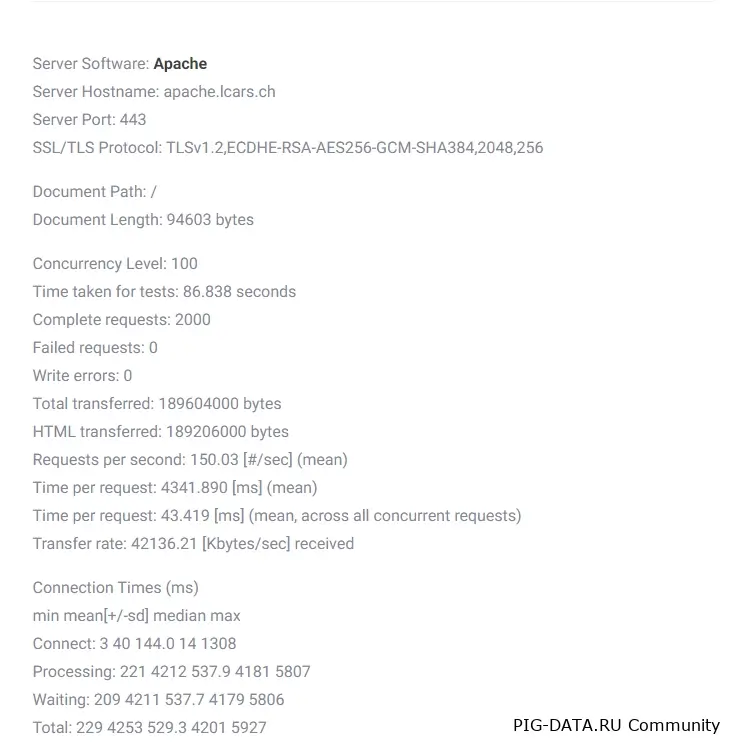
command ran: ab -n 2000 -c 100 URL
The command above tells ApacheBench to send 2000 requests, with a maximum of 100 requests running simultaneously.
Results:
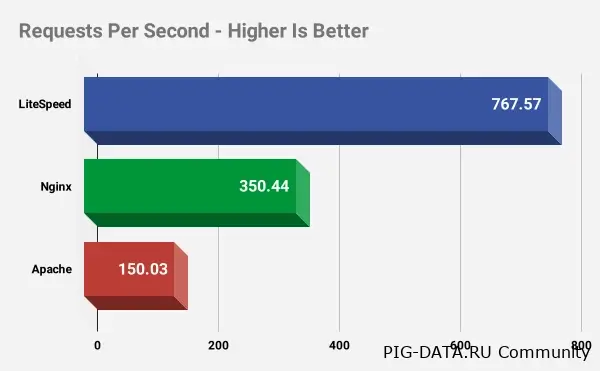
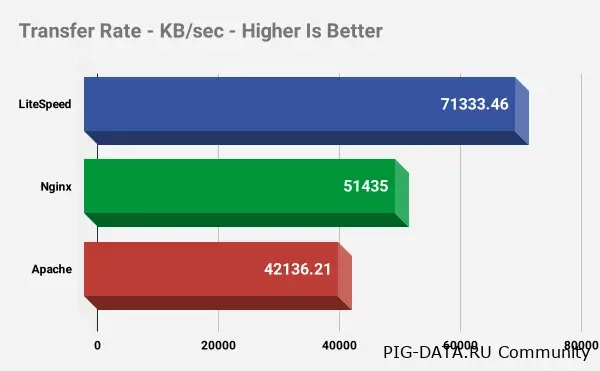
The results speak for themselves. Here are the results of one test run on three web servers

Here's the full ApacheBench results output:
Our own conclusion:
The results speak for themselves—LiteSpeed Web Server has a clear and significant performance advantage over its counterparts, which is why we recommend it for both personal use and web hosting, to speed up PHP sites or sites with static pages.